Posts under category 文字

控诉阿里云OSS储存,aliyun你能靠谱点吗

凌晨十分,自己的服务监控系统报警说acmore.cc有大批提交卡在正在运行状态无法评测,我第一反应是自己的代码出现了bug,本来有些无奈又有些高兴,心想不知道是哪位高手又爆出了我的代码bug。

熟练的打开IDE,远程近家里的Runner服务器,奇怪的事情发生了。

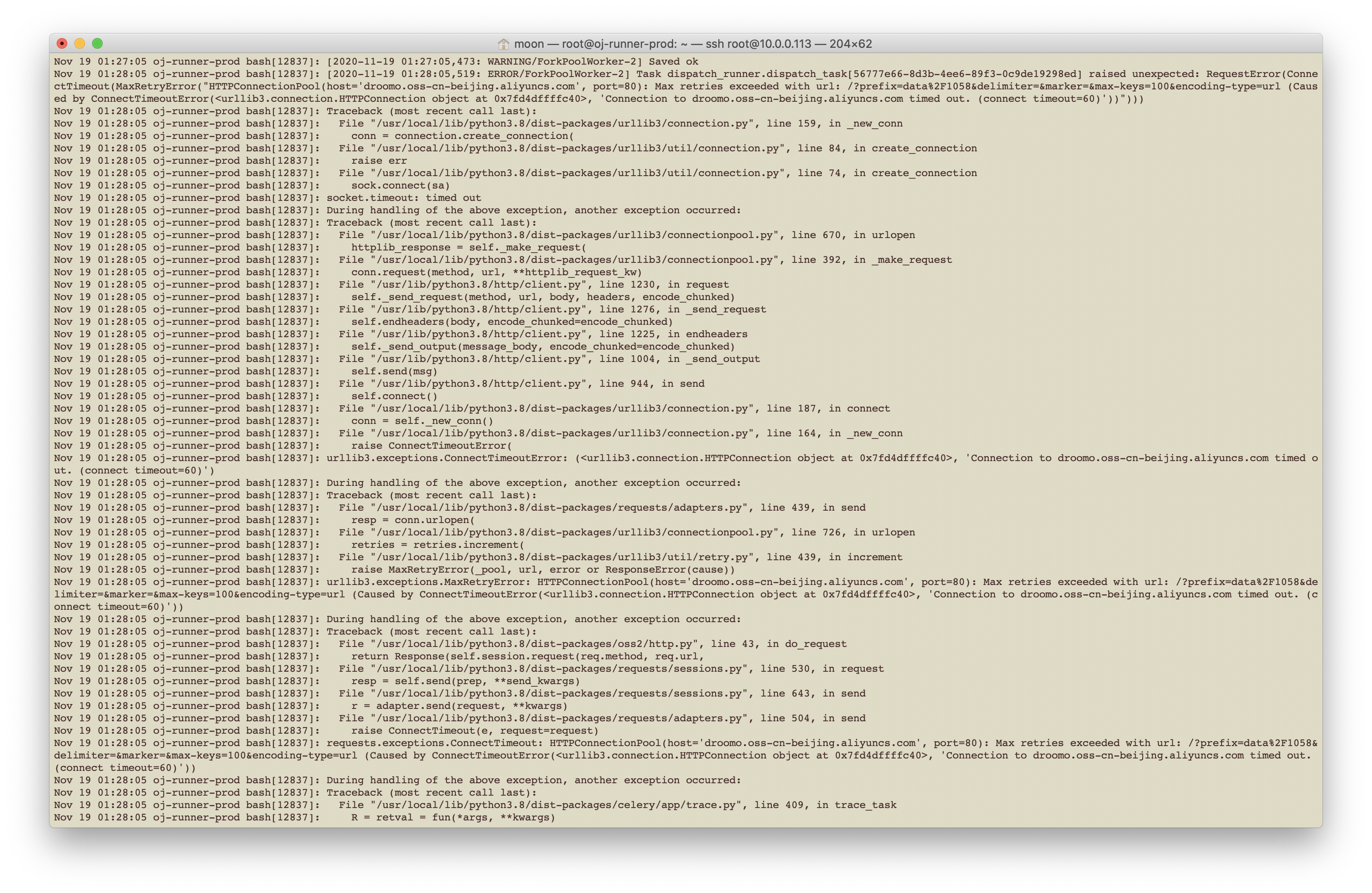
开发环境下的代码运行一切正常,远程Runner总是出现问题,查了一下log,发现竟然是Runner无法访问阿里云的重要的基础服务OSS储存!!!
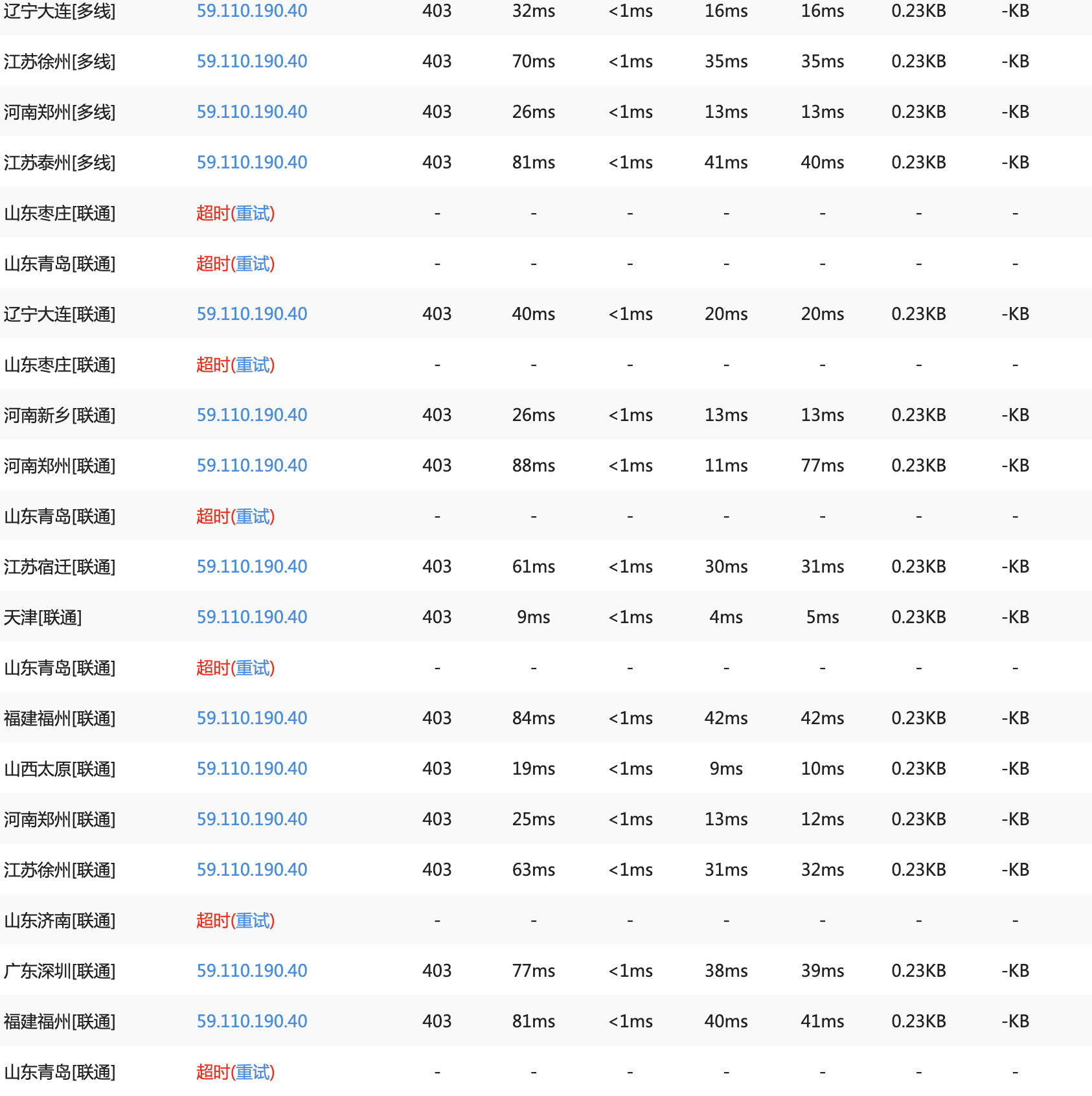
我刚开始以为是家里的宽带服务出现了问题,毕竟我实在拿家用宽带做着一些商用宽带才能做的事情,便重启了一下路由器,更换了一个公网IP,结果还是无法访问。接着随手找了个站长工具ping了一下oss ip,发现山东联通的线路全部无法访问了。

Screen Shot 2020-11-19 at 01.07.04.png

Screen Shot 2020-11-19 at 01.38.10.png

天呐,多么严重的事故!OSS算得上是阿里云提供的非常基础,非常重要的服务,竟然出了如此严重的问题!就像是本来卖西瓜的王婆家,突然西瓜全变成了石头蛋蛋,做生意有这样的吗??
这还是号称六个九安全性的阿里云?

Customize Onlyoffice server.

Remove any unnecessary fonts to reduce size of font files.

  1. Pull lastest docker image of onlyoffice server. Then cope new fonts to docker container.

    docker pull onlyoffice/documentserver
    docker stop office
    docker rm office
    docker run -i -t -d -p 5580:80 --restart=always --name=office onlyoffice/documentserver
    docker cp onlyoffice-fonts office:/usr/share/fonts/truetype/custom
    docker ps
    docker exec -it office bash
  2. Removing original fonts.

    rm -rf /var/www/onlyoffice/documentserver/core-fonts/*
    rm -rf /usr/share/fonts/X11
    rm -rf /usr/share/fonts/truetype/{* except custom path}
  3. Generate new fonts cache.

    bash /usr/bin/documentserver-generate-allfonts.sh

If you want update help documents for Chinese, run

cp -r /var/www/onlyoffice/documentserver/web-apps/apps/documenteditor/main/resources/help/en \
/var/www/onlyoffice/documentserver/web-apps/apps/documenteditor/main/resources/help/zh

systemctl .service file for vncserver under CentOS 7.7

People can do almost everything vis ssh under Linux, no exception for CentOS. But in some cases, using a X Windows improves efficiency greatly.

Tiger VNC server is a good server end package for VNC protocal under CentOS.
Tonight, just an hour ago, I encountered a disaster due to an unprofessional systemctl script privided by Tiger VNC server devolopers.

I’m tired so I shall not record the details.
If you are suffering problems while you are deploying autostart VNC server via systemctl, like:

  1. New main PID <pid> does not belong to service, and PID file is not owned by root. Refusing.;
  2. Enabled multiple vnc ports for no reason;
  3. Can not input password when the vnc client in locked screen;
    ....

Just try a .service file as fllow:
Do !NOT! forget to change USERNAME to your own user.

[Unit]
Description=Remote desktop service (VNC)
After=syslog.target network.target

[Service]
Type=forking

# Clean any existing files in /tmp/.X11-unix environment
ExecStartPre=/sbin/runuser -l <USERNAME> -c '/usr/bin/vncserver -kill %i > /dev/null 2>&1 || :'
ExecStart=/sbin/runuser -l <USERNAME> -c "/usr/bin/vncserver :1"
ExecStartPost=/bin/sh -c '/usr/bin/cat /home/<USERNAME>/.vnc/%H%i.pid > /tmp/vnc-server.pid'
PIDFile=/tmp/vnc-server.pid
ExecStop=/sbin/runuser -l <USERNAME> -c '/usr/bin/vncserver -kill %i > /dev/null 2>&1 || :'

[Install]
WantedBy=multi-user.target

Gogs迁移到Gitlab -- 利用Gitea作为中介完美迁移

在一段时间以来,我一直使用轻量级的Gogs作为私有代码仓库。最近一段时间苦于Gogs缺少CI、任务管理等一系列功能,准备将Gogs迁移到Gitlab。

网上找过很多迁移方法只能迁移仓库,issues信息会全部丢失。因此我探索了一个可以完整迁移repos、issues的办法,在此简单记录迁移过程,不做详细教程。如果你希望从本文中获得帮助,请确保拥有以下知识储备:

  1. 能够完成Gogs的备份;
  2. 能够完成Gogs与Gitea的升级、降级;
  3. 了解Gitea的Access Tokens的使用;
  4. 能够安装Gitlab(或熟悉Gitlab的使用)。

- Read More -

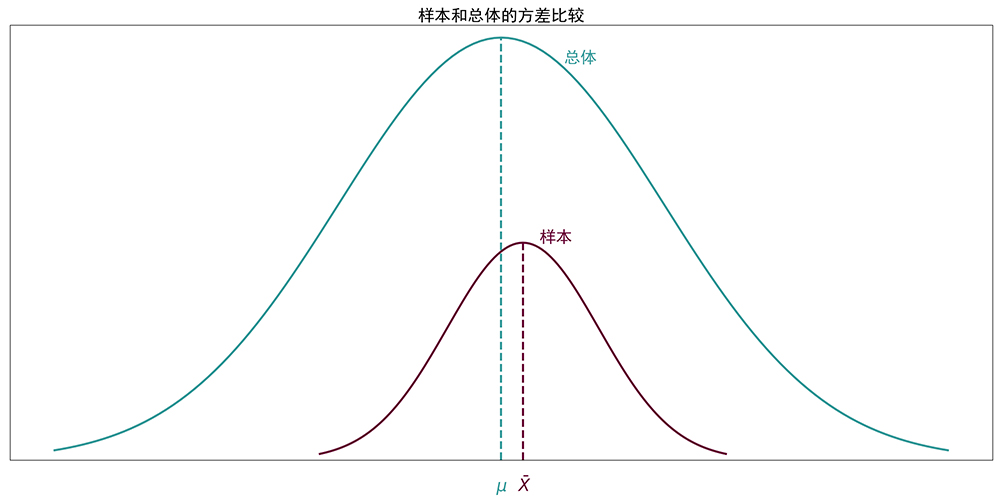
Python:样本和总体方差的比较示意图

未标题-1.jpg

绘制所用的Python代码如下:

import matplotlib.pyplot as plt
from scipy import linspace, sqrt
from scipy.special import erf
import numpy as np

color = '#339999'
color2 = '#660033'


def pdf(x, mu=0, sigma=1):
    """
    Calculates the normal distribution's probability density
    function (PDF).

    """
    term1 = 1.0 / (sqrt(2 * np.pi) * sigma)
    term2 = np.exp(-0.5 * ((x - mu) / sigma) ** 2)
    return term1 * term2


def cdf(_x):
    return (1 + erf(_x / sqrt(2))) / 2


def skew(_x, e, _w, a, z=100):
    t = (_x - e) / _w
    return z / _w * pdf(t) * cdf(a * t)


plt.figure(figsize=(20, 10))
plt.rcParams['font.sans-serif'] = ['SimHei']
plt.rcParams['axes.unicode_minus'] = False

n = 129
w = 2.5
y_text_offset = -0.5
y_title_offset = 8.1

fontsize = 24

middle_x = 0

x = linspace(middle_x - w * 3.3, middle_x + w * 3.3, n)
p = skew(x, middle_x, 3, 0)
plt.plot(x, p, 'r-', color=color, linewidth=3.0)
middle_index = list(p).index(max(p))
plt.text(x[middle_index + 12] - 0.4, max(p)-0.4, '总体', fontsize=fontsize, color=color)
plt.plot([x[middle_index], x[middle_index]], [0, p[middle_index]], '--', color=color,
         linewidth=3.0)
plt.text(x[middle_index] - 0.1, y_text_offset, '$\mu$', fontsize=fontsize, color=color)

plt.ylim([0, max(p) + 0.2])

middle_x = middle_x + 0.4
x = linspace(middle_x - w * 1.5, middle_x + w * 1.5, n)
p = skew(x, middle_x, 1.4, 0, 24)
plt.plot(x, p, 'r-', color=color2, linewidth=3.0)
plt.text(x[middle_index + 12] - 0.4, max(p), '样本', fontsize=fontsize, color=color2)
plt.plot([x[middle_index], x[middle_index]], [0, p[middle_index]], '--', color=color2,
         linewidth=3.0)
plt.text(x[middle_index] - 0.1, y_text_offset, r'$\barX$', fontsize=fontsize, color=color2)
print([min(x), max(x)])
plt.plot([min(x), max(x)], [y_text_offset, y_text_offset], 'r-', color=color2,
         linewidth=3.0)

plt.title('样本和总体的方差比较', fontsize=fontsize)

plt.yticks([])
plt.xticks([])

plt.show()
t检验与点二列相关的异同

t检验、点二列相关
两者侧重点不同,前者重在检验两列数据的均值差异,即宏观上是否来自同一总体,后者关注两列数据的相关程度。
相同点在都是一个二分数据将一列等距或等比数据分类,且两者数值可以通过公式相互转换。

转换的Python代码如下:

import math
import numpy as np


# s1 = [10, 9, 8, 8, 8, 7]
# s2 = [5, 5, 4, 4]

# s1 = [67, 73, 74, 70, 70, 75, 73, 68, 69]
# s2 = [69, 63, 67, 64, 61, 66, 60, 63, 63]

s1 = [84, 84, 88, 90, 78, 92, 94, 96, 88, 90]
s2 = [82, 76, 60, 72, 74, 76, 80, 78, 76, 74]

xbar1 = np.mean(s1)
xbar2 = np.mean(s2)


# Calculate sum of squares(和方)
def calc_ss(s):
  return sum(map(lambda x: x * x, s)) - sum(s) ** 2 / len(s)


ss1 = calc_ss(s1)
ss2 = calc_ss(s2)

xsquare1 = ss1 / (len(s1) - 1)
xsquare2 = ss2 / (len(s2) - 1)

print('Xbar1:', xbar1)
print('Xbar2:', xbar2)

print('SS1:', ss1)
print('SS2:', ss2)

print('Xsquare1:', xsquare1)
print('Xsquare2:', xsquare2)

spsquare = (ss1 + ss2) / (len(s1) + len(s2) - 2)
# 总体方差
print('SPsquare', spsquare)

se = np.sqrt( spsquare / len(s1) + spsquare / len(s2) )

print('SE:', se)


tobs = (xbar1 - xbar2) / se

print('t_obs:', tobs)

print('---------------------')

s3 = s1 + s2

sx = np.sqrt( calc_ss(s3) / len(s3) )

print('sx:', sx)

rpb = ((xbar1 - xbar2) / sx) * np.sqrt( (len(s1) / len(s3)) * (len(s2) / len(s3)) )

print('r_pb:', rpb)
print('t_obs:', tobs)
print('Fmax:', max(xsquare1, xsquare2) / min(xsquare1, xsquare2))

print(rpb ** 2, 'is r_pb^2')
print(tobs ** 2 / (tobs ** 2 + len(s1) + len(s2) - 2), 'is t^2 / (t^2 + df)')

Output:

Xbar1: 88.4
Xbar2: 74.8
SS1: 254.39999999999418
SS2: 321.59999999999854
Xsquare1: 28.26666666666602
Xsquare2: 35.73333333333317
SPsquare 31.999999999999595
SE: 2.5298221281346875
t_obs: 5.375872022286282
---------------------
sx: 8.662563131083052
r_pb: 0.7849870641173408
t_obs: 5.375872022286282
Fmax: 1.2641509433962497
0.616204690831562 is r_pb^2
0.6162046908315598 is t^2 / (t^2 + df)